
Every number in your Google Ads audit, checked.
Paste an audit from ChatGPT, Claude or your agency next to the export it came from, and see which numbers hold up. Or run a free audit of your own, where code computes every figure.
No sign-up and no access to your account. In the app, your export never leaves your computer.
38 seconds: check an AI audit, find wasted spend, audit the account structure and make a client-ready report.
AI audits sound right. Their numbers often aren't.
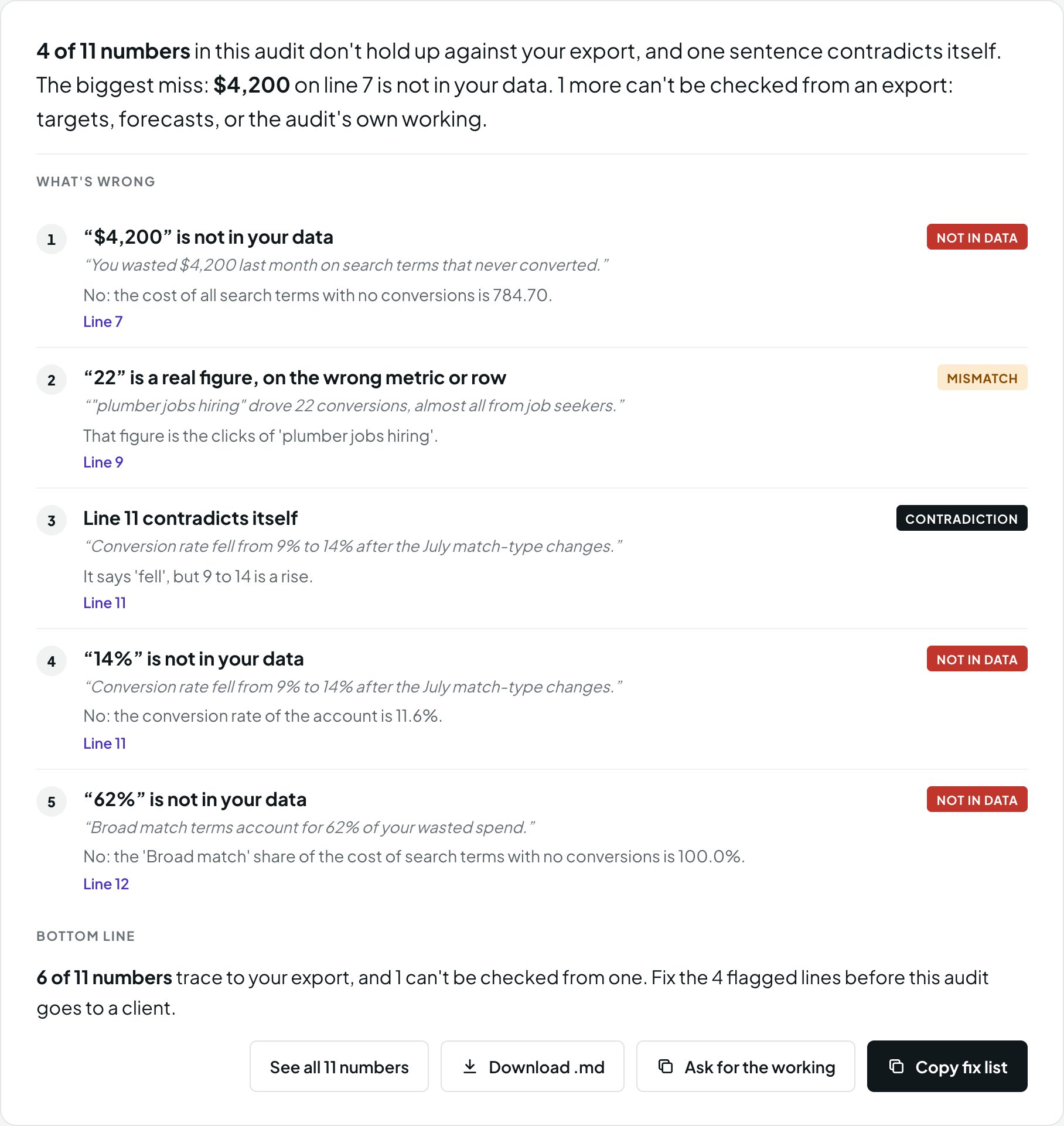
We pasted an AI-written audit of a sample plumbing account next to its search terms export. 4 of its 11 numbers didn't hold up, and one sentence contradicted itself.
OpenPPC marks every figure, says what your file actually shows, and gives you a fix list to send back to whoever wrote it.
Works inside Claude, Cursor and ChatGPT
Ask your assistant to audit an export or check an audit. It calls OpenPPC for the numbers, so every figure it gives you traces back to your data.
Claude
Claude Code, Claude Desktop and claude.ai. On your computer, OpenPPC reads your exports where they are.
$ claude mcp add openppc -- uvx --from "openppc[mcp] @ git+https://github.com/secondsteplabs/openppc" openppc-mcpClaude Desktop and claude.ai setup
Cursor
Add it in one click. It runs on your computer, next to your code and exports.
Add to CursorOr paste the server into ~/.cursor/mcp.json. Claude and Cursor use uv to fetch and run OpenPPC.
ChatGPT
ChatGPT reaches OpenPPC as a web connector. A hosted one at mcp.openppc.si is coming soon.
Until then, run OpenPPC on your computer and connect it through OpenAI's Secure MCP Tunnel, or host the connector yourself. It keeps nothing.
ChatGPT setupEvery assistant gets the same three read-only tools: list the templates, run an audit, and check an audit's numbers.
Three steps, and nothing leaves your computer
- 1
Export a report from Google Ads
A search terms or keywords report as a .csv. OpenPPC never connects to your account.
- 2
Check an audit, or run one
Paste any AI's audit to check it against the export, or run a free template on the export itself.
- 3
Every number traces back
Code computes each figure, and the checker traces it to your file before you see it.
An audit you can prove, from the export to the client
Free templates for the checks PPC teams run every week. Each one prints only numbers the code computed and the checker traced.
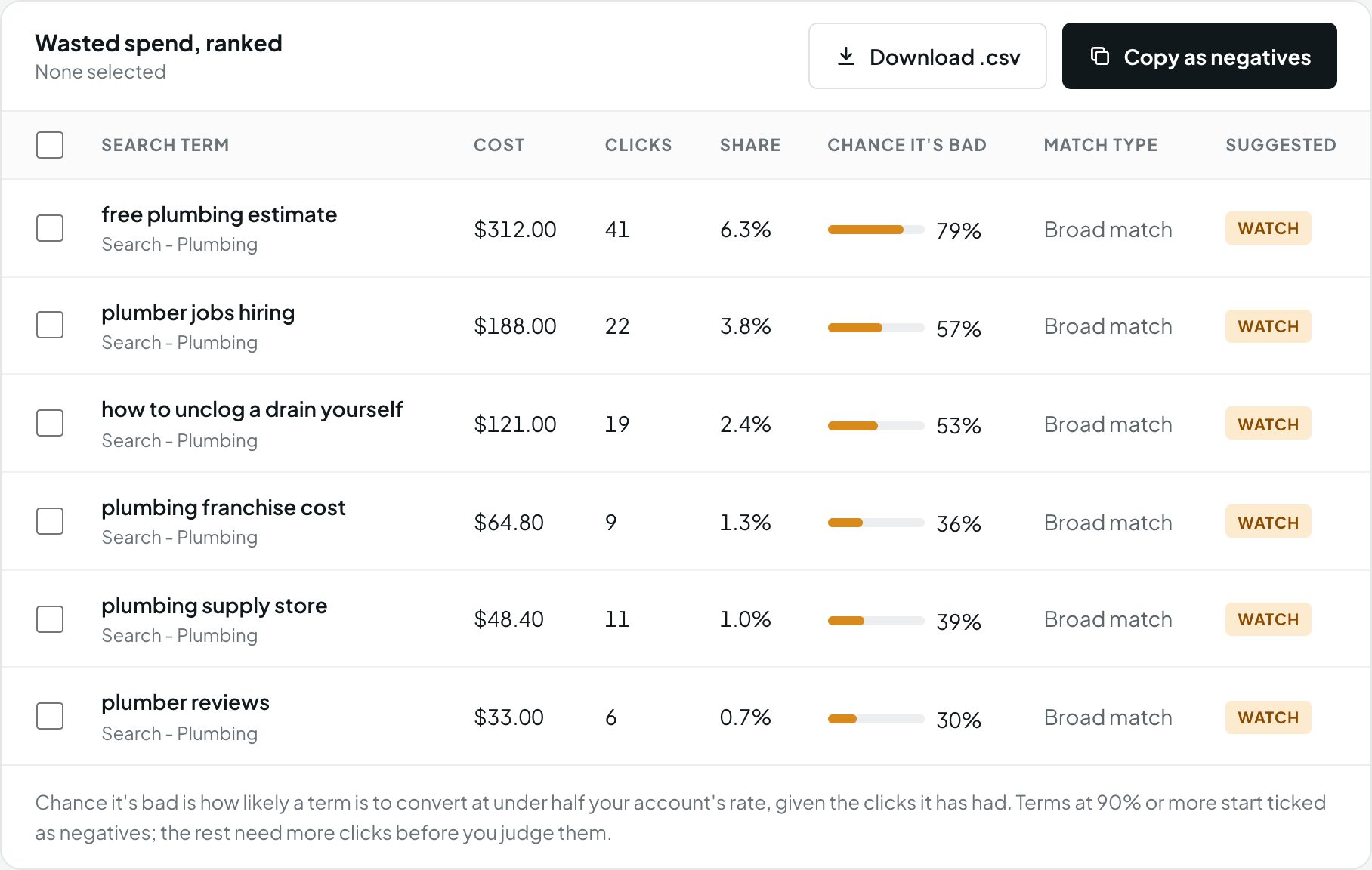
Wasted spend, ranked
Search terms that spent money and never converted, ranked by cost, with the chance each one is genuinely bad rather than unlucky.
- Block the proven losers and give the rest more clicks
- Copy them as exact-match negatives, or download a .csv
- Brand searches and Performance Max handled apart
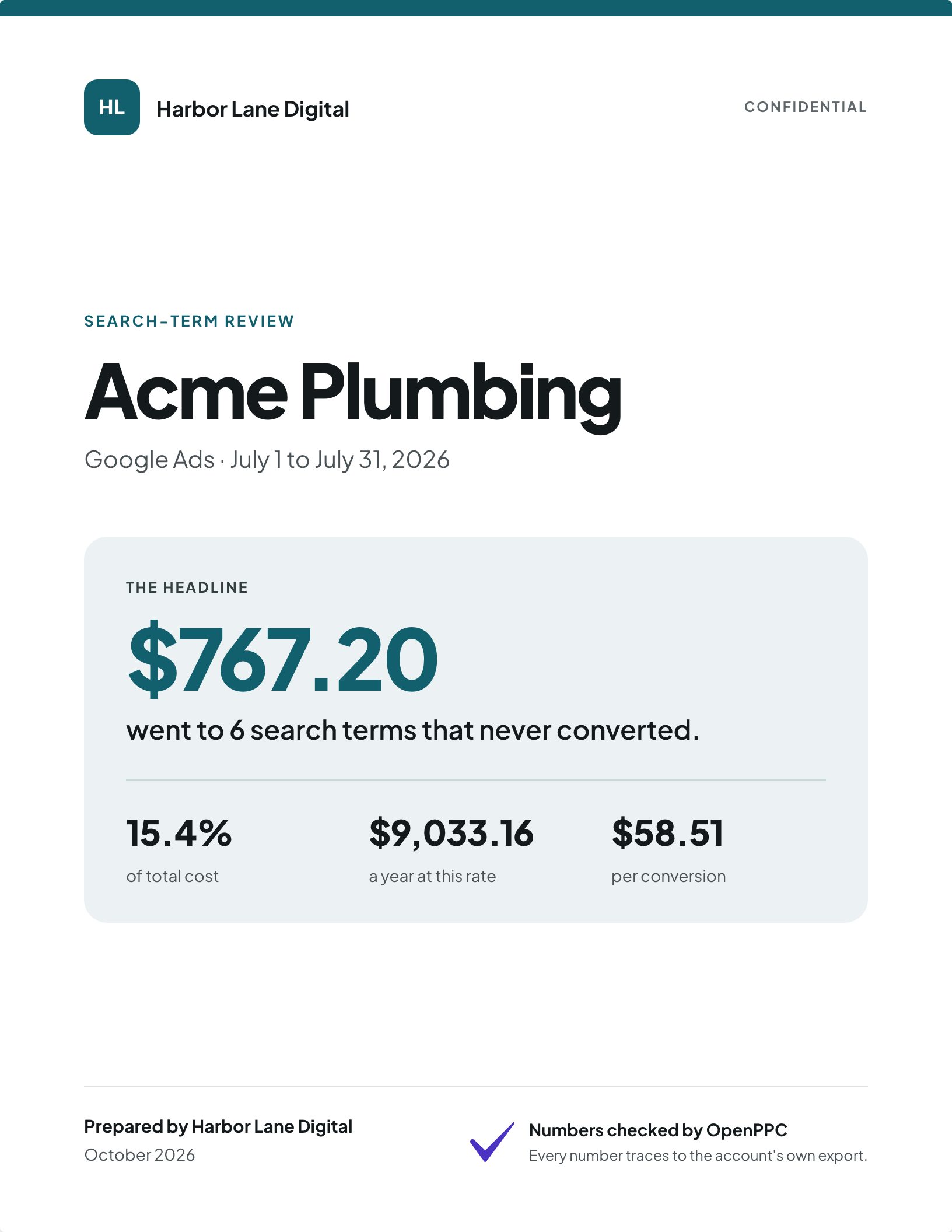
Client-ready reports, every number checked
Your agency's name, logo and colors on a formal report: a cover, what we found, what we recommend, how the account compares and how it was made.
- Letter or A4, laid out page by page
- Nothing is cut: long tables continue on the next page
- Saving unlocks only when every number traces
Account structure
Broad match without Smart Bidding, negatives that block your own keywords, brand mixed with non-brand, thin or pinned ads and more.
Keyword audit
Keywords spending without converting, budget by match type, and spend on low Quality Scores.
Period over period
What changed between two periods, and whether it reads as an efficiency win, over-expansion or broken tracking.
In the app, your export never leaves your computer
OpenPPC is built for agencies and freelancers working on client accounts, where uploading data is not an option. This is how the app handles your export; here is how the ChatGPT connector does.
Runs in the browser tab
The engine is compiled to WebAssembly and runs on your device. The first visit downloads it once.
Can't send your data
The app's security policy only lets it download its own runtime from one pinned source, so it has no way to upload your files.
Read-only
It never connects to Google Ads and never changes anything. You apply any change yourself.
Frequently asked
Is OpenPPC free?
Yes. The app, the templates and the checker are open source under the MIT license. You can use them, change them and run them yourself.
Does my data leave my computer?
Not in the app, the command line, Claude Code, Claude Desktop or Cursor: they all run OpenPPC on your computer. In ChatGPT and claude.ai, the export goes through a web connector to be audited, and the connector keeps nothing. To keep it on your computer in ChatGPT too, connect a local OpenPPC through OpenAI's Secure MCP Tunnel.
Which AI assistants does it work with?
Claude (Claude Code, Claude Desktop and claude.ai), Cursor and ChatGPT, through MCP. Your assistant calls OpenPPC for the numbers, so what it tells you traces back to your data. Any other MCP client works too.
Which audits can it check?
Any audit written as text: from ChatGPT, Claude, Gemini, another tool or an agency. Paste it next to the export it was written from.
Which Google Ads exports does it read?
Search terms and keywords reports as .csv, plus an account snapshot and two-period totals. The install guide shows how to export each one.
Does it change anything in my Google Ads account?
No. It never connects to Google Ads. It reads the file you give it, and you apply any change yourself.
Where do the industry averages come from?
From WordStream and LocaliQ's Google Ads Benchmarks 2026, US search. They are a ballpark for comparison, not a target.
Check your next audit before it reaches a client.
Open the app, try the sample account, then run it on your own export. It takes about a minute.